

Start here
What Makes an Action Camera Different
Next
Stabilization and Field of View Explained
Then
Shooting Modes Worth Knowing
Apply it
Mounting Options and Real-World Setups
Before you go
Before You Head Out: Setup Essentials
What Makes an Action Camera Different
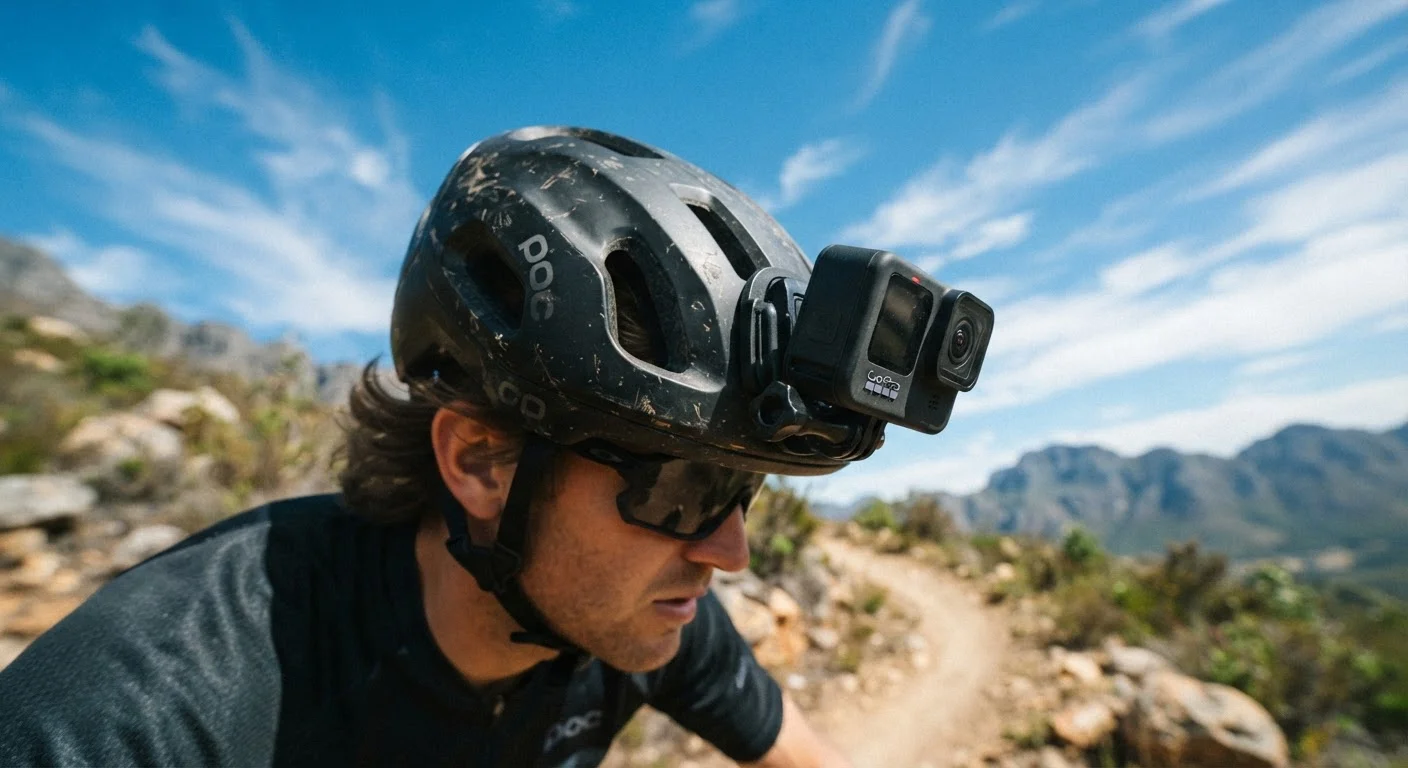
Action cameras are a distinct category of device built around one core idea: staying out of your way while you do something worth recording. Unlike smartphones or traditional camcorders, they are designed to be mounted on you or your gear — helmet, chest harness, surfboard, handlebars — rather than held in your hand.
Electronic image stabilization (EIS)
A software-based system that reduces the appearance of camera shake by digitally shifting frames. It works without moving parts, unlike optical stabilization found in some larger cameras.
Field of view (FOV)
The width of the scene a camera captures, measured in degrees. A wider FOV shows more of the surrounding environment; a narrower FOV looks more like a standard camera angle.
Frame rate (fps)
The number of individual images recorded per second. Higher frame rates produce smoother motion and enable slow-motion playback without choppy results.
Loop recording
A mode in which the camera continuously overwrites the oldest saved footage once the memory card fills up, ensuring uninterrupted recording without manual file management.
Time-lapse
A technique where the camera captures still images at set intervals and combines them into a short video, making slow changes — like a sunset or crowd movement — appear to happen quickly.
Waterproof rating (IPX / ATM)
A standardized measure of how well a device resists water intrusion. Action cameras often list a depth in meters under which they are protected — exceeding that depth or duration voids the protection.
That design philosophy drives nearly every trade-off in the category. Action cameras sacrifice optical zoom and large image sensors in exchange for a rugged, compact body, wide-angle lenses, and straightforward one-button operation. Most are waterproof or water-resistant without a case, and they record continuously without overheating the way a phone might. If you have ever tried to film yourself cycling while holding a phone, you already understand the problem these cameras solve.
Stabilization and Field of View Explained
Two specifications shape the look of your footage more than any others: stabilization and field of view (FOV).
Electronic Image Stabilization (EIS)
Action cameras use electronic image stabilization — software that analyzes motion data and digitally crops and shifts each frame to counteract camera shake. The result is noticeably smoother footage compared to unprocessed handheld or helmet-mounted video. The trade-off is a slight reduction in the total image area used, since the camera needs margin to work with. More advanced stabilization algorithms provide smoother results but can occasionally produce subtle distortion on fast lateral movements.
Field of View
Field of view describes how wide an angle the lens captures. Action cameras typically offer settings ranging from ultra-wide (sometimes exceeding 170 degrees) down to a narrower linear or narrow mode. Ultra-wide creates that signature immersive, slightly curved look. Linear mode corrects that curvature for a more natural perspective — useful when the fisheye effect would be distracting, such as in a travel vlog or instructional video. Narrow mode works like a mild zoom, bringing distant subjects closer at the cost of situational context.
Try Linear Mode Before Wide for Vlogs
If you are shooting yourself talking to the camera — for a travel log or instructional clip — linear FOV mode typically produces a more flattering, natural perspective than ultra-wide. Ultra-wide can make faces at close range look noticeably distorted. Save the wide setting for immersive action footage where the broad context adds to the experience.
Shooting Modes Worth Knowing
Most action cameras ship with several shooting modes. Understanding what each one does helps you match the tool to the moment rather than just hitting record and hoping for the best.
- Standard video: Continuous recording at your chosen resolution and frame rate. The everyday workhorse.
- Slow motion: Shoots at a high frame rate (120fps, 240fps, or higher) so footage can be played back at a slower speed without looking choppy. Useful for surfing, MTB tricks, or any fast-moving subject.
- Time-lapse: Captures a photo at set intervals and assembles them into a compressed video clip. Clouds rolling over a mountain or a city waking up are classic uses.
- Loop recording: Continuously overwrites the oldest footage once storage is full. Commonly used in dash cam setups where you want ongoing coverage without managing files constantly.
- Burst photo: Captures a rapid sequence of still images — useful when the decisive moment is hard to time precisely.
- Voice control: Lets you start and stop recording with spoken commands, which is practical when your hands are occupied.
Frame rate also matters independently of mode. Higher frame rates (60fps vs. 30fps) produce smoother motion in standard playback and give you more flexibility in post-editing.
Mounting Options and Real-World Setups
The right mount transforms the footage you capture. Most action cameras use a standardized finger-tab mounting system, and a wide ecosystem of third-party mounts has grown around these standards.
Common Mount Types
- Adhesive mounts
- Flat or curved sticky pads that bond to smooth surfaces — helmets, car roofs, surfboard decks. Durable but semi-permanent.
- Strap mounts
- Wrap around cylindrical objects like handlebars, roll bars, or wrists. Adjustable and reusable.
- Chest harnesses
- Place the camera at roughly sternum height for a stable, immersive POV that shows body movement without the head-bobbing of helmet footage.
- Tripod adapters
- Convert the action camera to standard tripod threading, opening up stationary time-lapse, interview, or wide-scene setups.
- Bite mounts
- Held between the teeth for a unique swimmer's or surfer's perspective. Not suitable for high-impact activities.
Mount placement also affects audio. Chest and helmet mounts pick up wind noise differently, and some cameras support external microphone adapters if audio quality matters to you.
Mount Compatibility Varies by Brand
While many action cameras share a similar finger-tab mounting standard, accessories are not always cross-compatible between manufacturers without an adapter. Before purchasing a mount accessory separately, verify it lists compatibility with your specific camera model. Third-party mounts that conform to widely used standards generally offer the broadest compatibility.
Before You Head Out: Setup Essentials
Getting your camera ready before the activity is worth a few minutes of attention. Our guide on setting up a new device correctly walks through the broader process — firmware updates, warranty registration, and privacy permissions — that applies to action cameras just as much as any other gadget.
A Short Pre-Outing Checklist
- Charge fully and carry a spare battery if the activity runs longer than 90 minutes.
- Format your memory card in-camera rather than on a computer — this prevents file system errors.
- Set the date and time so file metadata and any GPS-tagged footage is accurate.
- Test your mount at home before relying on it in the field — adhesive bonds need cure time after application.
- Check your field of view and stabilization settings match the activity you have planned.
- Review location and Wi-Fi settings if the camera connects to a companion app; be intentional about what data is shared.
Action cameras generate large files quickly, so having a plan for transferring and backing up footage after each outing prevents storage headaches down the road.
Frequently Asked Questions
Many action cameras include a waterproof body rated for shallow depths without any extra case. If you plan to dive deeper or want added protection for extreme conditions, a dedicated housing extends that rating significantly. Check the manufacturer's published depth rating and activity guidelines before heading into water.
1080p (Full HD) is more than sufficient for most beginners and produces smooth, manageable file sizes. 4K recording captures more detail and gives you flexibility in post-production, but it demands faster memory cards and more storage space. Start with 1080p and move up when you have a clear reason to.
Most action cameras provide roughly 60–90 minutes of continuous recording on a single charge, though this varies with resolution, stabilization use, and temperature. Cold weather can noticeably shorten battery life. Carrying a spare battery or a small power bank is a common workaround for longer outings.
Wide field of view captures a broad scene — ideal for immersive first-person footage. Narrow field of view looks more like a traditional camera angle and reduces the fisheye distortion that wide shots can produce. Some cameras let you switch between modes so you can match the look to your activity.
Absolutely. Action cameras work well for travel vlogs, documenting hikes, capturing family moments outdoors, or even as a dash cam alternative. Their compact size and durability make them versatile tools beyond extreme sports.
Action cameras typically require a microSD card rated at UHS Speed Class 3 (U3) or Video Speed Class 30 (V30) or higher — especially for 4K recording. Using a slower card can cause dropped frames or recording errors. Always check the camera's documentation for the recommended specification.
The content on this site is for informational purposes only and is not a substitute for professional advice. Always consult a qualified professional for guidance specific to your situation.